LinkedIn Post Template: A Practical Guide to Writing Posts People Actually Want to Read
Writing on LinkedIn doesn't have to start with a blank page. Discover practical LinkedIn post templates, proven content frameworks, real-world examples, and the best tools to help you write engaging posts consistently.
InstaInker Team
InstaInker
LinkedIn Post Template: Why Starting Is Often the Hardest Part
If you've ever stared at the blinking cursor on LinkedIn wondering how to begin your post, you're not alone.
For most professionals, the problem isn't a lack of ideas. It's turning those ideas into a post that's clear, engaging, and worth reading.
That's exactly where a LinkedIn post template becomes useful.
Not because it writes your content for you but because it gives your thoughts a structure.
What Is a LinkedIn Post Template?
LinkedIn post templates should be seen as a structure rather than a script.
These are not ready-made templates that you need to copy-paste in each new post.
They serve as a basic structure that will help you organize your thoughts.
If you write about the lesson that you learnt from working with a difficult client, you could jump from one thought to another without having a clear structure.
But if you use a template, it'll all become much clearer.
For instance:
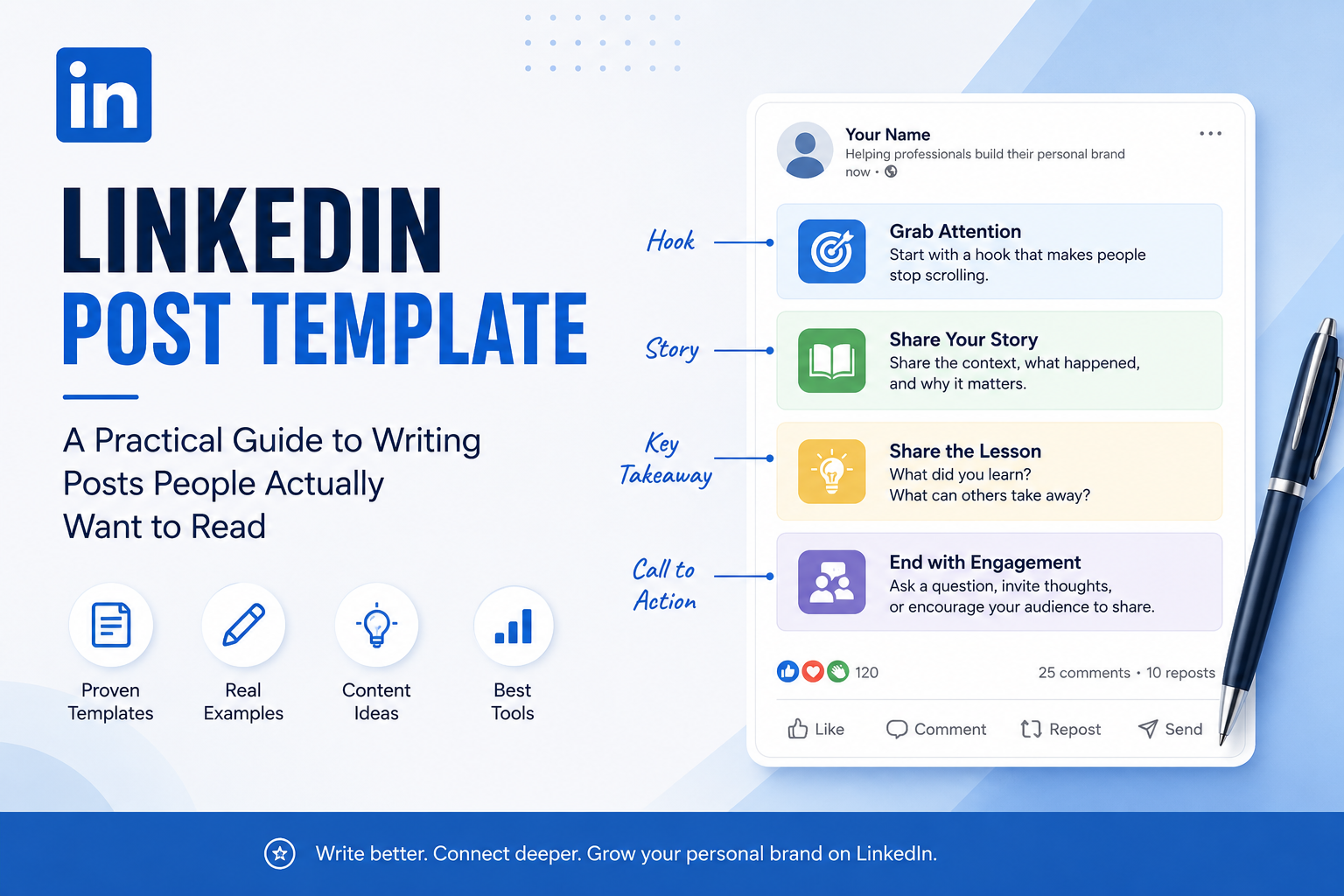
- Give an example that people will relate to.
- Tell your audience what happened.
- Describe the lessons learned.
- Finish with a question or conclusion.
This is still your personal story.
The only thing that the template does here is making your post easy to read.
Why Templates Do Not Make Your Content Generic
One of the most common misconceptions that we often hear about LinkedIn templates is that they make all posts the same.
That only happens when people copy the words instead of the structure.
Think about TED Talks.
Most speakers follow a similar flow: introduce an idea, tell a story, explain the lesson, and leave the audience with something memorable.
Nobody complains that every TED Talk feels identical because the stories are different.
LinkedIn works the same way.
The structure can stay consistent.
Your experiences should never be.
Five LinkedIn Post Templates That Actually Work
Instead of trying to reinvent the wheel every time, many professionals rotate between a few proven formats.
1. The Lesson Learned Template
One situation, one lesson, one takeaway.
Example:
I thought hiring faster would solve our growth problem.
It didn't.
The real issue wasn't speed.
Once we knew precisely what we were after, it was easy to hire them.
2. The Mistake Template
People instinctively relate to honesty.
Rather than just telling your successes, reveal something that didn’t work out.
Example:
Three months ago, I posted on LinkedIn almost daily.
None of them performed well.
The difference that changing one mindset made completely transformed the quality of the content I was producing.
People usually get more out of errors than accomplishments.
3. The Before & After Template
It is especially effective for consultants, agencies, recruiters, and coaches.
Example:
Before
Our clients couldn't comprehend our offer.
After
We streamlined our messaging.
In just two months we got way more inquiries.
Instead of discussing your experience, you show its effects.
4. The Industry Observation Template
The most efficient pieces sometimes originate from an observation you have made.
E.g. Here is what I have noticed over the past year.
More professionals are investing time in building a LinkedIn presence.
But many are still treating LinkedIn like an online résumé.
The professionals seeing the biggest opportunities aren't necessarily the most experienced.
They're the ones consistently sharing what they know.
Posts based on observations always spur healthy debates because people agree with you or present a counterpoint.
5. The List Template
Lists are still popular due to their readability.
Example: Three ways I enhanced my LinkedIn content:
1. Writing shorter paragraphs
2. Using strong hooks to begin
3. Posting regularly instead of flawlessly
It is simple,practical and easy to recall.
Should You Use AI to Make LinkedIn Posts?
Artificial intelligence has revolutionized content creation.
But faster doesn't always mean better.
One thing I've noticed is that AI usually gives you a clean first draft.
What it can't do is replace your experience.
It doesn't know the client conversation that changed your thinking.
It wasn't in the meeting where your biggest lesson happened.
That's why the strongest LinkedIn posts still come from real experiences.
AI should help organise your thoughts; not invent them.
Which Tools Can Help You Create Better LinkedIn Posts?
While there are many resources that can make the process of writing easier, they all address various issues.
For those in need of grammar suggestions, Grammarly would be a decent pick.
To generate ideas or to get out of writer's block, ChatGPT would work well, provided you personalize the end result.
In case you care about formatting the most, AuthoredUp shows how the post will look like once published.
Frequent authors and professionals might want to check Taplio, which unites AI writing, scheduling, and analytics into one resource.
The perfect resource may not have the biggest number of functions if your workflow is built on LinkedIn, then Instainker is a more universal solution. Not only does it provide an option to generate ideas, it also helps with writing, formatting, optimizing profiles, scheduling posts, repurposing content, and maintaining the consistency of the writing style without having to switch between platforms.
It's the one that fits the way you work.
Common Mistakes People Make
One mistake I see repeatedly is trying to sound impressive.
Complicated words rarely make content more valuable.
Clear writing does.
Another mistake is forcing every post into the same viral format.
Not every post needs dramatic one-line sentences or exaggerated hooks.
Sometimes a straightforward story is far more effective.
Finally, don't wait for the perfect idea.
Most successful LinkedIn creators improve by publishing consistently, not by endlessly editing one draft.
Frequently Asked Questions
How long should a LinkedIn post be?
There isn't an optimal length, but the most successful posts are often under 200 words or even over 1,000 words. The idea is to keep each sentence relevant instead of just hitting a certain word count.
Does every LinkedIn post need to be written according to a template?
Absolutely not. Templates are guides but shouldn't be used as an excuse to write everything in the same way.
Can ChatGPT create LinkedIn post templates?
Definitely. You can get a structure and even a draft, but you'll have to fill in your own experience and point of view to make the post worth reading.
What is the best LinkedIn post template?
That entirely depends on what you want to achieve with your post. Storytelling helps with personal branding, lists work great for giving actionable advice, and "before/after" posts tend to be especially effective for consultants and agencies.
Final Thoughts
Consistent writing on LinkedIn will be a lot easier if you stop staring at a blank sheet of paper each time.
A template for your LinkedIn posts will not take away your creativity.
Instead, it will provide a way for your thoughts to flow.
From a career lesson to any business-related observation, a structure will help your reader to follow you from the start till the finish of your post.
In the end, nobody will follow a creative person just because he is using the best template out there.
Related Articles
Start Creating Better LinkedIn Content
Use InstaInker to generate engaging posts tailored to your style.
Get Started Free